
The Testing Challenge
AI agents are becoming critical infrastructure. From customer support to data analysis, organizations are deploying agents that make decisions, call APIs, and generate responses autonomously. But this raises a fundamental question: how do you test something that produces non-deterministic outputs?
Traditional software testing relies on deterministic assertions. Given input X, expect output Y. But when an LLM is at the core of your system, the same prompt can produce semantically equivalent but textually different responses every time. Your agent might say “You have 3 properties” today and “I found three listings for you” tomorrow. Both are correct, but assertEqual will fail.
This post introduces the LLM-as-judge pattern, a technique we developed to solve this problem. We’ll walk through how we built an end-to-end testing framework for our AI agent that uses a separate, more capable LLM to evaluate responses, enabling reliable automated testing of inherently non-deterministic systems.
What is an AI Agent?
Before diving into testing, let’s establish what we mean by an “agent.” At its core, an AI agent consists of three components:
1. The Harness (System Prompt)
The harness defines the agent’s personality, constraints, and context. It’s the system prompt that shapes how the LLM behaves, what it knows about itself, and what rules it should follow.
In production, this isn’t a simple paragraph. Our system prompt is a structured document spanning several hundred tokens, organized into sections:
1
2
3
4
5
6
7
8
9
10
11
12
13
14
15
16
17
18
19
20
21
22
23
24
25
26
27
28
29
30
31
32
33
34
35
36
37
38
39
40
41
42
43
44
45
<identity>
You are Neyoba, the AI revenue management assistant for Beyond...
</identity>

<role>
Help users make smarter pricing and performance decisions. Surface insights,
explain data clearly, and guide users to appropriate actions...
</role>

<constraints>
- Cannot process file uploads or generate downloadable files
- If listing lacks dynamic pricing, recommend enabling it first
- Never suggest disabling Beyond pricing
- Never use internal terminology...
</constraints>

<formatting>
- Links: inline HTML with target="_blank"
- Structure: bold headers, short paragraphs, markdown headings
- Data: use tables for comparisons...
</formatting>

<localization>
- Spanish: formal "usted" unless user uses "tú"
- Portuguese: Brazilian conventions
- Dates/currency/spelling: match user's region...
</localization>

<response-behavior>
  <ambiguous-questions>
    For broad questions ("how am I doing?"):
    1. State your interpretation
    2. Deliver most actionable insight first
    3. Offer 2-3 specific follow-ups
  </ambiguous-questions>

  <pacing-questions>...</pacing-questions>
  <clarifications>...</clarifications>
</response-behavior>

<tool-usage>
- Never call get_listing_details_by_id in loops
- For 50+ listings, use market-level aggregates
- Combine tools: get_listings for IDs, then get_bookings for details...
</tool-usage>
The prompt covers identity, role definition, hard constraints, formatting rules, localization preferences, response length guidelines, multi-turn conversation handling, and tool usage patterns. This level of detail is essential for consistent, production-quality agent behavior.
You can explore our full production system prompt on LangSmith Prompt Hub.
2. The Reasoning Loop (ReAct Pattern)
The agent uses a reasoning loop to decide what to do next. We implement the ReAct (Reasoning + Acting) pattern via LangGraph, where the LLM can:
- Reason about the user’s request
- Decide which tool to call
- Process tool results
- Generate a final response
3. The Tools (MCP Server)
Tools give the agent real capabilities. We use the Model Context Protocol (MCP) to expose tools via an SSE server. The agent can call tools like get_listings, get_bookings, or get_revenue_data to fetch real information from our database.
Here’s how these components interact in a typical request:
sequenceDiagram
    participant User
    participant Agent as ReactAgent
    participant LLM as LLM (GPT-5 Mini)
    participant MCP as MCP Server
    participant DB as Database

    User->>Agent: "What are my listings?"
    Agent->>LLM: System prompt + User message
    LLM->>Agent: Tool call: get_listings(token)
    Agent->>MCP: Execute tool via SSE
    MCP->>DB: Query listings
    DB->>MCP: Listing data
    MCP->>Agent: Tool result
    Agent->>LLM: Tool result + context
    LLM->>Agent: Final response
    Agent->>User: "You have 3 listings..."
Why Traditional Assertions Fail
Consider this test case: “Ask the agent for a list of properties and verify it returns them correctly.”
With traditional testing, you might write:
1
2
3
def test_get_listings():
    response = agent.invoke("What are my listings?")
    assert response == "You have 3 listings: Beach House, Mountain Cabin, City Apartment"
This test will fail immediately. The agent might respond with:
- “I found 3 properties in your portfolio: Beach House, Mountain Cabin, and City Apartment.”
- “You have three listings:\n1. Beach House\n2. Mountain Cabin\n3. City Apartment”
- “Here are your 3 listings: Beach House, City Apartment, Mountain Cabin” (different order)
All three responses are correct. They contain the same information. But string matching fails because LLMs are non-deterministic by design. Even with temperature=0, subtle variations in tokenization, context, and model state can produce different outputs.
You could try fuzzy matching or regex, but this quickly becomes unmaintainable. How do you write a regex that matches “3”, “three”, and “3 properties” while rejecting “2 listings”?
The solution: let an LLM do the evaluation.
The LLM-as-Judge Pattern
The core insight is simple: if an LLM can generate natural language, another LLM can evaluate it. We use a separate, more capable model as a “judge” to score the agent’s responses against specific criteria.
Here’s the architecture:
flowchart LR
    subgraph Trigger[Trigger]
        CLI[CLI]
        Web[Web App]
    end

    subgraph Framework[Test Framework]
        Executor[Test Executor]
        DB[(PostgreSQL)]
    end

    subgraph Agent[Agent Under Test]
        RA[ReactAgent]
        LLM1[GPT-5 Mini]
        MCP[MCP Server]
    end

    subgraph Eval[Evaluation]
        Judge[LLM Judge]
        LLM2[Claude Opus 4.5]
    end

    CLI --> Executor
    Web --> Executor
    Executor <--> DB
    Executor --> RA
    RA <--> LLM1
    RA <--> MCP
    Executor --> Judge
    Judge <--> LLM2
The judge receives three inputs:
- The original user prompt - what was asked
- The agent’s response - what the agent said
- Evaluation criteria - what constitutes a good response
It returns:
- A score between 0.0 and 1.0
- Reasoning explaining the score
Here’s a simplified implementation:
1
2
3
4
5
6
7
8
9
10
11
12
13
14
15
16
17
18
19
20
21
22
23
24
25
26
27
28
29
30
31
32
33
34
35
36
37
38
39
40
41
42
43
44
45
46
47
48
49
50
51
52
53
54
JUDGE_SYSTEM_PROMPT = """You are an expert evaluator of AI assistant responses.
Your task is to score responses based on specific criteria provided by the user.

You must respond with ONLY a JSON object in this exact format:
{"score": 0.85, "reasoning": "Brief explanation of the score"}

The score must be a float between 0.0 and 1.0:
- 1.0 = Perfect response that fully meets all criteria
- 0.8+ = Good response that meets most criteria with minor issues
- 0.6-0.8 = Acceptable response with some missing elements
- 0.4-0.6 = Partial response with significant gaps
- Below 0.4 = Poor response that fails to meet criteria

Be objective and consistent in your evaluation."""


async def judge_response(
    response_content: str,
    prompt: str,
    judge_prompt: str,
    threshold: float,
    model: str = "claude-opus-4-5",
) -> JudgeResult:
    evaluation_prompt = f"""Evaluate the following AI assistant response.

<user_prompt>
{prompt}
</user_prompt>

<ai_response>
{response_content}
</ai_response>

<evaluation_criteria>
{judge_prompt}
</evaluation_criteria>"""

    client = anthropic.AsyncAnthropic()
    message = await client.messages.create(
        model=model,
        max_tokens=500,
        system=JUDGE_SYSTEM_PROMPT,
        messages=[{"role": "user", "content": evaluation_prompt}],
    )

    result = json.loads(message.content[0].text)
    passed = result["score"] >= threshold

    return JudgeResult(
        passed=passed,
        score=result["score"],
        threshold=threshold,
        reasoning=result["reasoning"],
    )
The Model Hierarchy Strategy
A key design decision: the judge should be more capable than the agent being tested.
Our agent uses GPT-5 Mini for production, optimizing for cost and latency. But for evaluation, we use Claude Opus, a more capable model with stronger reasoning abilities.
This works because:
- The judge doesn’t need domain knowledge - it only evaluates whether criteria are met
- Evaluation is simpler than generation - it’s easier to judge quality than to produce it
- Cost is acceptable for testing - you run tests less frequently than production queries
Configuration example:
1
2
3
4
5
6
7
8
9
config = {
    "agent": {
        "model": "openai:gpt-5-mini",
    },
    "judge": {
        "model": "anthropic:claude-opus-4-5",
        "default_threshold": 0.7,
    },
}
The Scoring Rubric Approach
The judge uses a consistent scoring rubric:
| Score | Meaning |
|---|---|
| 1.0 | Perfect response that fully meets all criteria |
| 0.8+ | Good response with minor issues |
| 0.6-0.8 | Acceptable with some missing elements |
| 0.4-0.6 | Partial response with significant gaps |
| < 0.4 | Poor response that fails to meet criteria |
Each test case defines its own evaluation criteria via a judge_prompt. This allows you to be specific about what matters for each scenario:
1
2
3
4
5
6
7
8
9
10
11
12
test_case = {
    "name": "get_listing_details",
    "prompt": "What are the details of my Beach House listing?",
    "expected_tools": ["get_listing_details"],
    "judge_prompt": """The response should contain:
        - The listing name (Beach House)
        - The property address
        - Current pricing information
        - Occupancy rate or availability status
        The information should be formatted clearly and be easy to read.""",
    "judge_threshold": 0.7,
}
The threshold is configurable per test. Critical paths might require 0.9+, while exploratory features might accept 0.6.
Multi-Round and Agent Revival Testing
Real conversations aren’t single-turn. Users ask follow-up questions, refer to previous context, and expect the agent to remember what was discussed.
Our framework supports multi-round testing:
1
2
3
4
5
6
7
8
9
10
11
12
13
14
test_case = {
    "name": "multi_round_conversation",
    "rounds": [
        {
            "prompt": "What are my listings?",
            "judge_prompt": "Should list all properties",
        },
        {
            "prompt": "What's the occupancy for the first one?",
            "judge_prompt": "Should reference the first listing from previous response and show occupancy data",
        },
    ],
    "test_agent_revival": True,
}
The test_agent_revival flag is particularly interesting. It tests whether the agent can:
- Complete round 1
- Close the session entirely
- Reopen with the same agent ID
- Continue the conversation with context preserved
This validates that your checkpointing and state persistence work correctly, catching bugs that would only appear when users return to conversations after server restarts.
Complementary Validators
The LLM judge is powerful but not the only validator. We combine it with deterministic checks:
Tool Validator
Verify that expected MCP tools were called:
1
2
3
4
5
6
7
8
9
def validate_tools(response, expected_tools):
    called_tools = extract_tool_calls(response)
    missing = [t for t in expected_tools if t not in called_tools]
    return ToolValidationResult(
        passed=len(missing) == 0,
        expected_tools=expected_tools,
        called_tools=called_tools,
        missing_tools=missing,
    )
This is deterministic. If the test expects get_listings to be called and it wasn’t, that’s a clear failure regardless of what the response says.
Database Validator
Verify that conversations and messages are persisted correctly:
1
2
3
4
5
6
7
8
9
10
11
12
def validate_database(agent_id, verify_conversation=True, verify_messages=True):
    if verify_conversation:
        conversation = get_conversation_by_id(agent_id)
        if not conversation:
            return DatabaseValidationResult(passed=False, message="Conversation not found")

    if verify_messages:
        messages = get_messages_by_thread(agent_id)
        if len(messages) < 2:
            return DatabaseValidationResult(passed=False, message="Expected at least 2 messages")

    return DatabaseValidationResult(passed=True)
The Follow-up Detection Pattern
Here’s an edge case that caused many false failures: sometimes the agent asks for clarification instead of answering.
User: “What’s the occupancy?” Agent: “I’d be happy to help! Which listing would you like to see the occupancy for?”
This is valid agent behavior, but it fails a test expecting occupancy data. The solution: use another LLM to detect clarification requests and auto-respond.
1
2
3
4
5
6
7
8
9
10
11
12
13
14
15
16
17
18
19
20
21
22
23
24
25
26
async def check_needs_followup(ai_response: str, original_prompt: str) -> tuple[bool, str]:
    check_prompt = f"""Analyze this AI response to determine if it's asking for clarification.

<original_user_request>
{original_prompt}
</original_user_request>

<ai_response>
{ai_response}
</ai_response>

If the AI is asking for clarification, respond with:
{{"needs_followup": true, "followup_response": "A reasonable response providing the needed clarification"}}

If the AI provided a substantive answer, respond with:
{{"needs_followup": false, "followup_response": ""}}"""

    client = anthropic.AsyncAnthropic()
    message = await client.messages.create(
        model="claude-sonnet-4-20250514",
        max_tokens=300,
        messages=[{"role": "user", "content": check_prompt}],
    )

    result = json.loads(message.content[0].text)
    return result["needs_followup"], result["followup_response"]
The executor uses this to automatically continue conversations up to a maximum number of follow-ups, ensuring tests evaluate the final answer rather than intermediate clarifications.
Democratizing Test Creation: The Web UI
One final insight: testing shouldn’t be engineers-only.
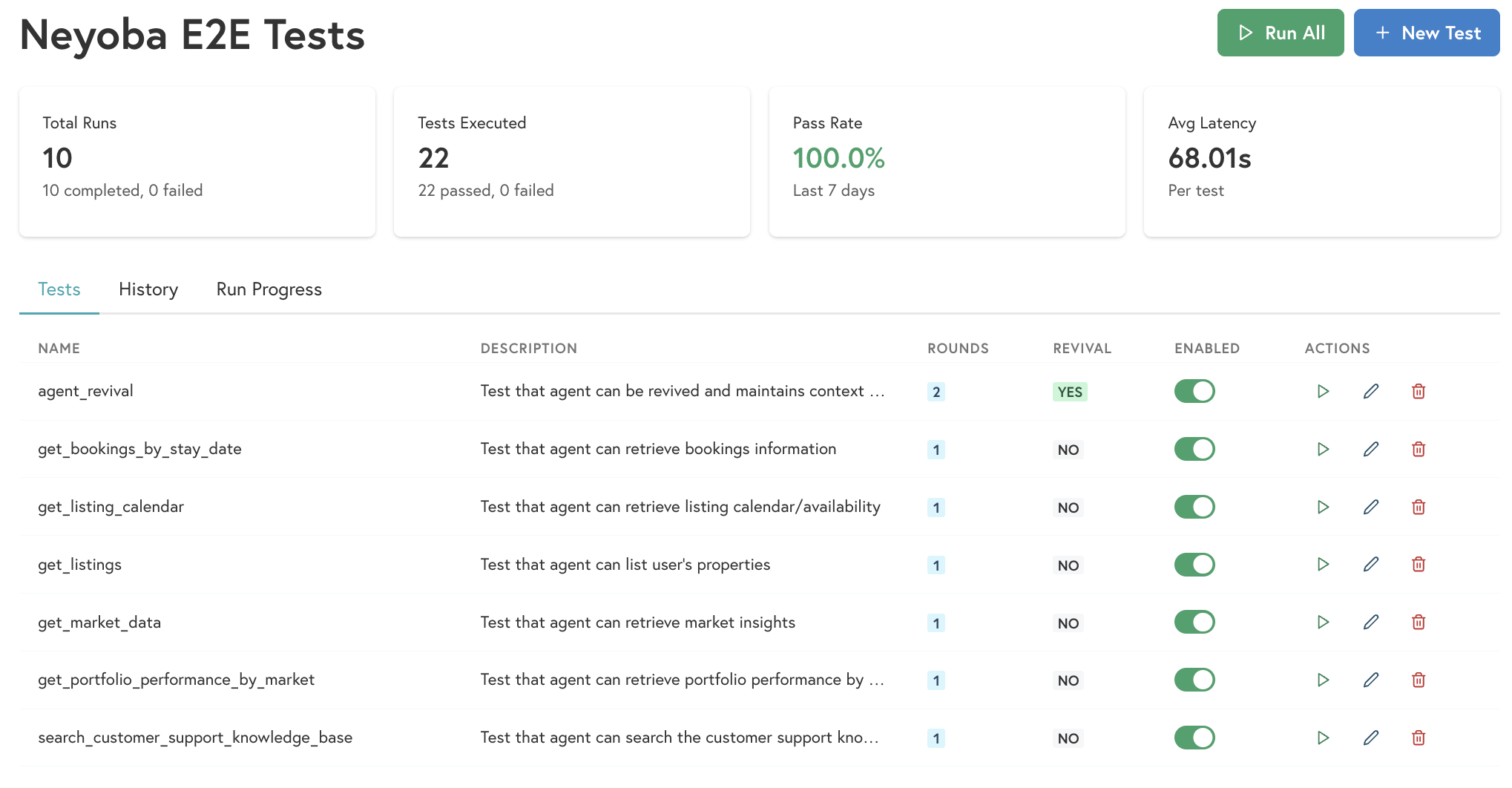 The web UI shows test results with judge scores and reasoning for each round
Product managers often understand user intent better than engineers. They know what users actually ask and what good answers look like. But if tests live in code, PMs can’t contribute.
Our solution: store test cases in PostgreSQL and build a web UI for creating and managing them.
Why a database instead of config files:
- Non-engineers can participate without code changes
- Test history and results are preserved
- Easy to build dashboards and analytics
- Supports the web UI and CLI equally
Dual interfaces:
- CLI for engineers and CI pipelines
- Web App for everyone else
Benefits:
- PMs can define test scenarios based on real user questions
- Faster iteration on test coverage
- No pull requests required to add new tests
- Visibility into test results for the whole team
The web UI lets anyone create a test case by filling in:
- A name and description
- The user prompt
- Expected tools (optional)
- Judge evaluation criteria
- Pass/fail threshold
Results are stored and displayed in a dashboard, making it easy to track agent quality over time.
Conclusion
Testing AI agents requires a fundamental shift in approach. Traditional assertions fail because LLM outputs are non-deterministic by design. The LLM-as-judge pattern solves this by using a more capable model to evaluate responses against semantic criteria rather than exact matches.
Key takeaways:
Use a superior model as judge - Claude Opus evaluating GPT-5 Mini responses works well because evaluation is simpler than generation.
Combine LLM evaluation with deterministic checks - Tool validation and database verification catch issues that semantic evaluation might miss.
Test multi-round conversations - Real users have follow-up questions. Test that context persists correctly.
Handle clarification loops - Agents asking for clarification is valid behavior. Detect it and auto-respond to get to the actual answer.
Democratize test creation - Store tests in a database with a web UI so non-engineers can contribute. They often understand user intent better than we do.
The result is a testing framework that catches real regressions while tolerating the natural variation in LLM outputs. Our agents are more reliable, and our whole team can contribute to quality.